
Speed Galaxy Keyboard Escape Controls Guide
WASD, jump timing, camera zoom, and how not to yeet yourself off a candy key at 10K Speed.
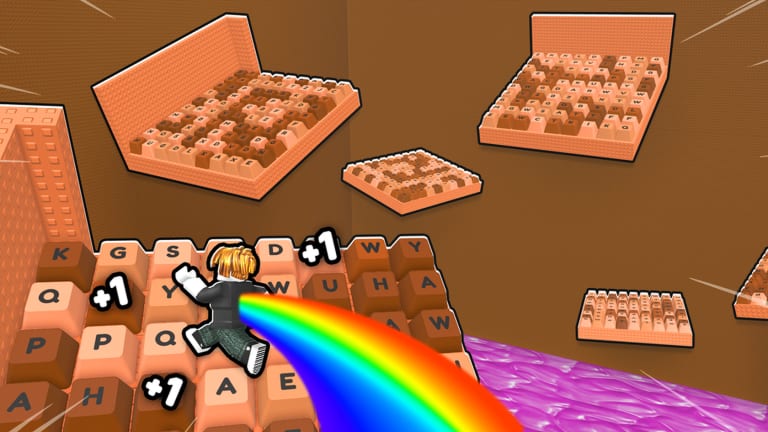
Speed Galaxy Keyboard Escape uses ordinary Roblox movement, then breaks it by making you faster every few seconds. Most “I can’t beat this stage” tickets are camera and braking problems, not missing secret keys.
Use this page next to getting started and stages. Galaxy 2’s loop-de-loop skip is on the Galaxy 2 walkthrough.
PC keyboard
| Action | Input |
|---|---|
| Move | W A S D or arrow keys |
| Jump | Space |
| Camera zoom in | I |
| Camera zoom out | O |
| Server leaderboard | Tab |
| Shrink (secrets / gaps) | M on many accounts — confirm in-game if rebound |
| Roblox shift-lock | Shift (if enabled in Roblox settings) |
There is no dedicated “brake” key. You brake by releasing W, turning, or jumping in place on a safe key. At high Speed, holding W into a wall is how you die.
Mobile and console
Thumbstick or on-screen joystick moves. Jump is the standard Roblox jump button. Pinch or the camera buttons replace I/O. The HUD Code / FREE! / Shop cluster is easier in landscape. Console players who cannot click Code should enable Roblox pointer mode — same note as how to redeem.
Do not put the jump button under the same thumb you use to steer during vanishing-bridge stages. Two-thumb play is enough; claw grip is optional flex.
Camera habits that save runs
- Zoom out (O) on long Galaxy and World 3 jumps so you see the landing key.
- Zoom in (I) on loop-de-loop centers and tsunami climbs so you can aim the hole.
- Keep the camera behind the avatar on rolling-ball stages. Side cameras hide the tell.
- If the world is a candy blur, your Speed outran your camera. Stop on a safe key, zoom out, then continue.
ASMR key sounds are not controls, but they can mask jump audio tells. If you miss timing, switch to a quieter pack in the sound shop (Cream / Chocolate / Candy / Clicker are the free set).
High-Speed movement
After a few Rebirths and a strong Trail, walking is closer to flying. Rules:
- Tap jump; do not hold Space the entire stage.
- Approach vanishing platforms from a straight line. Strafing at 100K Speed slides you off.
- For the G2 loop, look at the hole, not the decorative rail.
- If a kill brick sits at the end of a corridor, release W early and let momentum finish.
- Shift-lock helps on precision keys and hurts on rolling obstacles. Toggle per stage.
Hats that raise raw walk speed (Muffin Hat, Candy Crown) make this worse before they make it better. Buy Trails first.
HUD buttons that are not movement
Left/top cluster typically includes Code, FREE!, Shop, teleport, Rebirth (when eligible), and sometimes a treadmill summon. None of these pause the game. Do not open Shop mid-jump.
Tab shows who is fastest on this server, not a global hall of fame. Use it for racing, not for deciding whether to Rebirth.
Accessibility and AFK
Treadmills exist so you can stop using WASD. Stand still, look at a second monitor, and let Chocolate tick. Anti-AFK kicks still exist on long idle; a tiny camera nudge or a script anti-AFK toggle (risky) is how some players overnight farm. This wiki’s legal recommendation is: play, or use the official treadmill, or accept the kick.
If a control is rebound in Roblox’s own menu, the game honors it. If M does not shrink you, SecretVerse may have moved the bind — check the in-game settings panel before following a three-month-old secret video.
Once movement feels boring, you are ready to farm Wins instead of practicing jumps that a Trail would trivialize.
Frequently Asked Questions
Quick answers to the most common Speed Galaxy Keyboard Escape questions.
What are the Speed Galaxy Keyboard Escape controls?
WASD or joystick to move, Space or the jump button to jump, I/O to zoom, Tab for the server leaderboard. There is no brake key — release forward movement.
How do I stop at high Speed?
Release W, turn on a wide key, or jump in place in a safe zone. Do not hold forward into kill bricks or dead-end walls.
Does mobile have a Code button?
Yes, in the top HUD. Use landscape if icons overlap. Codes are covered on the how-to-redeem page.
What does M do?
Many secret guides use M to shrink for gaps in World 2. If it does nothing, the bind changed — check in-game settings. Shrinking is optional for normal pads.